
How We Test Used Cameras at Shutterbug Camera Shop
A practical look at how we inspect used digital and film cameras, what tested means, and how we document condition, accessories, and known issues.
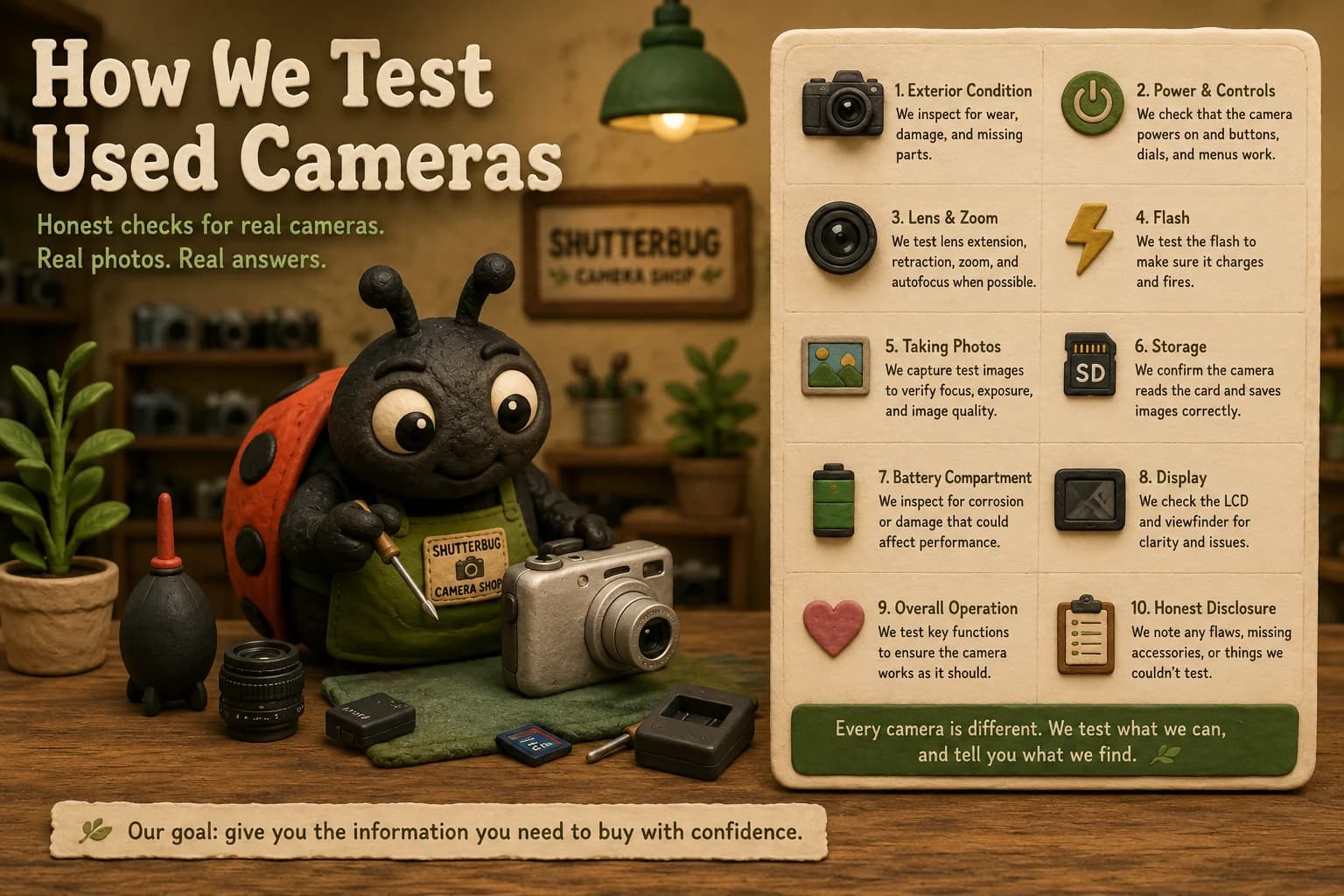
Buying a used camera is different from buying something new off a shelf. A camera may be 5 years old, 15 years old, or in some cases several decades old. It may have traveled across the country, spent years in a closet, photographed thousands of family memories, or simply been forgotten in a drawer.
That history is part of what makes older cameras interesting. It also means condition matters. At Shutterbug Camera Shop, our goal is to give buyers as much useful information about a camera as we reasonably can before it ships.
We do not want every used camera described as great condition and leave it at that. We want you to know what you are actually buying.
What does tested mean at Shutterbug?
If something could not be tested, the listing should say so.
There is not one universal test that applies to every camera. A Canon PowerShot from the early 2000s has completely different functions from a 35mm film SLR. An Olympus Stylus compact camera requires different checks than a Nikon DSLR. Instant cameras, mirrorless cameras, and vintage point-and-shoots all have their own quirks.
Because of that, the exact testing process depends on the camera. When a listing is marked as tested, it means we have checked the functions that are reasonably available and relevant to that particular model.
We start with the physical condition
Before worrying about menus or megapixels, we look closely at the camera itself. Older cameras are rarely perfect, and a little wear does not necessarily make a camera bad. In many cases, cosmetic wear is completely normal for equipment that has been used for years.
- Cracks or impact damage
- Missing covers or doors
- Scratches and cosmetic wear
- Battery-compartment condition
- Corrosion
- Loose components
- Damaged buttons or switches
- Lens damage
- LCD or viewfinder condition
- Strap-mount and body condition
What matters is describing that wear accurately.
Power and basic operation
For electronic cameras, one of the first major checks is whether the camera powers on correctly. Some vintage digital cameras use discontinued batteries, unusual chargers, proprietary cables, or uncommon memory cards.
- Camera powers on and off normally
- Startup completes without obvious errors
- Buttons respond
- Dials and switches work
- Menu navigation functions
- LCD display operates
- Battery door closes correctly
When an accessory or compatibility limitation affects testing, we disclose it rather than guess.
Lens and zoom testing
The lens is one of the most important parts of any camera. On compact digital cameras, we generally look at whether the lens extends and retracts properly and whether optical zoom responds as expected. For cameras with interchangeable lenses, the body and lens may be evaluated separately.
- Lens extension and retraction
- Optical zoom
- Autofocus
- Lens-cover operation
- Obvious lens errors
- Visible damage, scratches, haze, or fungus
Vintage equipment can have dust, haze, fungus, scratches, or mechanical wear. When we see something significant, our goal is to disclose it.
Taking an actual photograph
When the equipment and available accessories allow it, one of the most useful tests is simply taking a photograph. This can help verify several functions at once.
- Focuses
- Captures an image
- Writes the image to a memory card
- Displays the captured image
- Produces an obviously usable result
For some cameras, especially older film cameras, confirming image quality would require developing film. That is not practical for every individual camera, so testing may focus more heavily on mechanical operation.
Flash
Built-in flashes are especially common on vintage digital compact cameras and point-and-shoot film cameras. Where appropriate, we check whether the flash charges and fires.
Flash systems can take longer to charge on older cameras, particularly when batteries are weak or the camera has not been used for a long time. If a flash does not work properly, or was not tested, we want the listing to make that clear.
Buttons, controls, and displays
Older cameras can develop problems that are not immediately obvious. A camera might power on perfectly but have one button that does not respond, a mode dial that skips positions, an LCD with dead pixels, or an inconsistent control wheel.
- Shutter button
- Directional controls
- Menu and playback buttons
- Zoom controls
- Mode dial
- Control wheels
- LCD screen
- Viewfinder and status displays
The exact checks depend on the model.
Memory cards and storage
Vintage digital cameras are particularly interesting because storage technology changed rapidly during the 1990s and 2000s. When compatible media is available, we may verify that the camera recognizes the storage device and can save photographs.
- SD cards
- CompactFlash
- Memory Stick
- xD-Picture Card
- SmartMedia
- MultiMediaCard
- Internal memory
- Other proprietary formats
Compatibility can depend on card capacity. An older camera that worked with a 128MB card in 2003 may not recognize a modern high-capacity card. Buyers should check the exact storage requirements of their model.
Battery compartments matter more than you might think
Battery compartments are one of the first places older electronics can develop serious problems. Cameras stored for years with batteries inside can suffer from corrosion or leakage, so we inspect the compartment for obvious damage.
Minor residue may sometimes be cleanable, while severe corrosion can affect electrical contacts and make a camera unreliable. When battery-compartment condition is important, we want customers to see it in the listing photographs or description.
Film cameras require a different approach
Film cameras do not always provide the immediate feedback of a digital camera. Testing may focus on the mechanical and electronic functions that can be checked without developing a full roll of film.
- Film advance and rewind
- Shutter release and operation
- Film-door latch
- Meter response
- Autofocus where applicable
- Flash operation
- Lens movement
- Electronic controls
A mechanical test is not the same as shooting and developing an entire roll. If a camera has not been film-tested, the listing should distinguish that from the functions we were able to check.
What's included matters too
A functional camera can still be frustrating if a buyer does not realize the charger, battery, lens cap, memory card, or cable is not included. That is why accessories are part of the listing process.
- Battery and charger
- Memory card
- Lens and lens cap
- Strap or camera case
- USB or proprietary cable
- Original box and manuals
- Other included accessories
We try to identify what comes with the camera clearly. If something is not shown or stated as included, buyers should not have to assume it is there.
We separate parts and repair cameras
Not every old camera should be sold as working. Some are useful for replacement parts or restoration projects. That is why parts and repair inventory stays clearly separated from tested working equipment.
A non-working camera is not necessarily worthless. It just needs to be represented honestly.
Cosmetic condition and functional condition aren't the same
A camera can look beautiful and have a serious electronic problem. Another camera can have scratches across the body and work perfectly. Those are two different things.
We separate cosmetic observations from functional testing so buyers can decide what matters most. Collectors may care heavily about appearance, while someone buying a camera to use may care more about the lens, flash, sensor, and controls. Neither priority is wrong.
Why we show photographs of the actual products
The clay art gives Shutterbug its personality. The actual product photographs show you what you are buying.
Shutterbug Camera Shop uses a distinctive clay-art style throughout the website. The clay cameras, shelves, plants, and Shutterbug characters are part of the visual world we created for the store.
The cameras we sell, however, are real. Product listings in the Shutterbug shop are intended to show photographs of the actual physical item being offered for sale.
Those photographs matter because every used camera is different. Two cameras with the same model number can have completely different cosmetic condition, included accessories, and history.
We're still building
Shutterbug Camera Shop is still approaching its full launch. We are continuing to add inventory, improve our testing workflow, refine product pages, expand camera guides, and organize the wide variety of equipment that comes through the shop.
That means our testing and documentation processes will continue improving. The principle behind them will not change: tell buyers what we know, show them what they are getting, and do not pretend we tested something we did not.
Older cameras are too interesting to reduce to a generic stock photograph and a one-line description. We are building Shutterbug Camera Shop to do things a little differently, one camera at a time.